> For the complete documentation index, see [llms.txt](https://docs.stackingdao.com/stackingdao/llms.txt). Markdown versions of documentation pages are available by appending `.md` to page URLs; this page is available as [Markdown](https://docs.stackingdao.com/stackingdao/the-stacking-dao-app/native-staking-with-btc-yield/depositing-stx-in-native-staking-pool.md).
# Depositing STX in Native Staking Pool
## Staking STX
{% stepper %}
{% step %}
## Open the Stacking DAO app
Open the [Stacking DAO app](https://app.stackingdao.com/) and connect your Stacks wallet.
{% endstep %}
{% step %}
## Select Native Staking
Choose **Stacks**, enter the amount of STX you want to stake, and select the third option: **Native Staking: with BTC Yield**.
The summary below the options shows the cycle in which your stake starts earning, your estimated annual yield, and the points you will earn.
{% endstep %}
{% step %}
## Confirm your stake
Click **Confirm Stake**. A **Stake STX** window opens showing the amount, when it starts earning, and the 5% protocol fee on rewards.
{% endstep %}
{% step %}
## Choose reward payout
Under **Reward payout**, choose how you want to receive your rewards.
**Bitcoin (L1).** Rewards are sent as BTC to a Bitcoin address. The address is filled in from your wallet. Click the pencil to use a different one.
**Stacks (L2), with "Send to my wallet automatically" switched on.** Rewards are sent to your Stacks wallet as sBTC.
**Stacks (L2), with the switch off.** You claim your rewards yourself, whenever you like.
**If you stake less than 2,000 STX:** The Bitcoin option is not available, its tab is greyed out and the window opens on Stacks (L2). You can switch to Bitcoin later under Payout settings, once you have at least 2,000 STX staked.
{% endstep %}
{% step %}
## Stake and approve
Click **Stake** and approve in your wallet. Depending on the payout you chose, the app asks for one to three approvals, one after the other:
| Payout chosen | Approvals |
| -------------- | ------------------------------------------------------------- |
| Claim yourself | 1: stake |
| Sent as sBTC | 2: stake, then set the payout |
| Sent as BTC | 3: stake, then save your Bitcoin address, then set the payout |
Keep the window open until it shows **Done**.
{% endstep %}
{% endstepper %}
{% hint style="warning" %}
Check your Bitcoin address carefully. Rewards sent to a wrong address cannot be recovered. Any standard Bitcoin address works (starting with 1, 3, bc1q or bc1p).
{% endhint %}
## What happens to your STX
* Your STX stays in your wallet. It is locked there as soon as your stake confirms.
* It starts earning from the start of the next staking cycle. The app shows the cycle number and roughly how long until it begins.
* Staking is paused during the prepare phase, the last \~100 Bitcoin blocks of each cycle (roughly 17 hours). During that time the button shows when staking reopens.
## Your position
After staking, your position appears under **Active positions** as **Native Staking**. The card shows your staked STX, the current APY, and how your rewards are paid.
To add more STX later, select Native Staking in the stake form again and enter the new total you want staked (what you already have staked plus what you are adding).
## Changing how rewards are paid
Click **Payout settings** on the Native Staking card, pick the new option, click **Switch payout** and approve the transaction in your wallet. Once it confirms, the new option applies, including to rewards you have not claimed yet.
Every change is a transaction you approve in your wallet. Switching to Bitcoin needs at least 2,000 STX staked, and with a new address it takes two approvals: one to save the address, then one to switch the payout. In that case the button reads **Save address and switch**.
## Receiving your rewards
{% tabs %}
{% tab title="Claim yourself" %}
Your rewards appear on the **Bitcoin Rewards** card. Click **Claim**, then choose Bitcoin (L1) to receive BTC at a Bitcoin address, or Stacks (L2) to receive sBTC in your Stacks wallet. Claiming to Bitcoin has a network fee, so small amounts are better claimed on Stacks.
{% endtab %}
{% tab %}
{% endtab %}
{% tab title="Rewards sent as sBTC" %}
They arrive in your Stacks wallet on their own once at least 1,000 sats have built up. Until then they wait on a **Native staking payout** tile. Click **Withdraw** on it to receive them right away.
{% endtab %}
{% tab title="Rewards sent as BTC" %}
Your position card shows the address they go to. They are sent once at least 10,000 sats have built up, and the Bitcoin network fee is taken from them. While BTC is on its way, a **BTC reward payout** tile shows its progress.
{% endtab %}
{% endtabs %}
## Moving from the Original Pool to V2
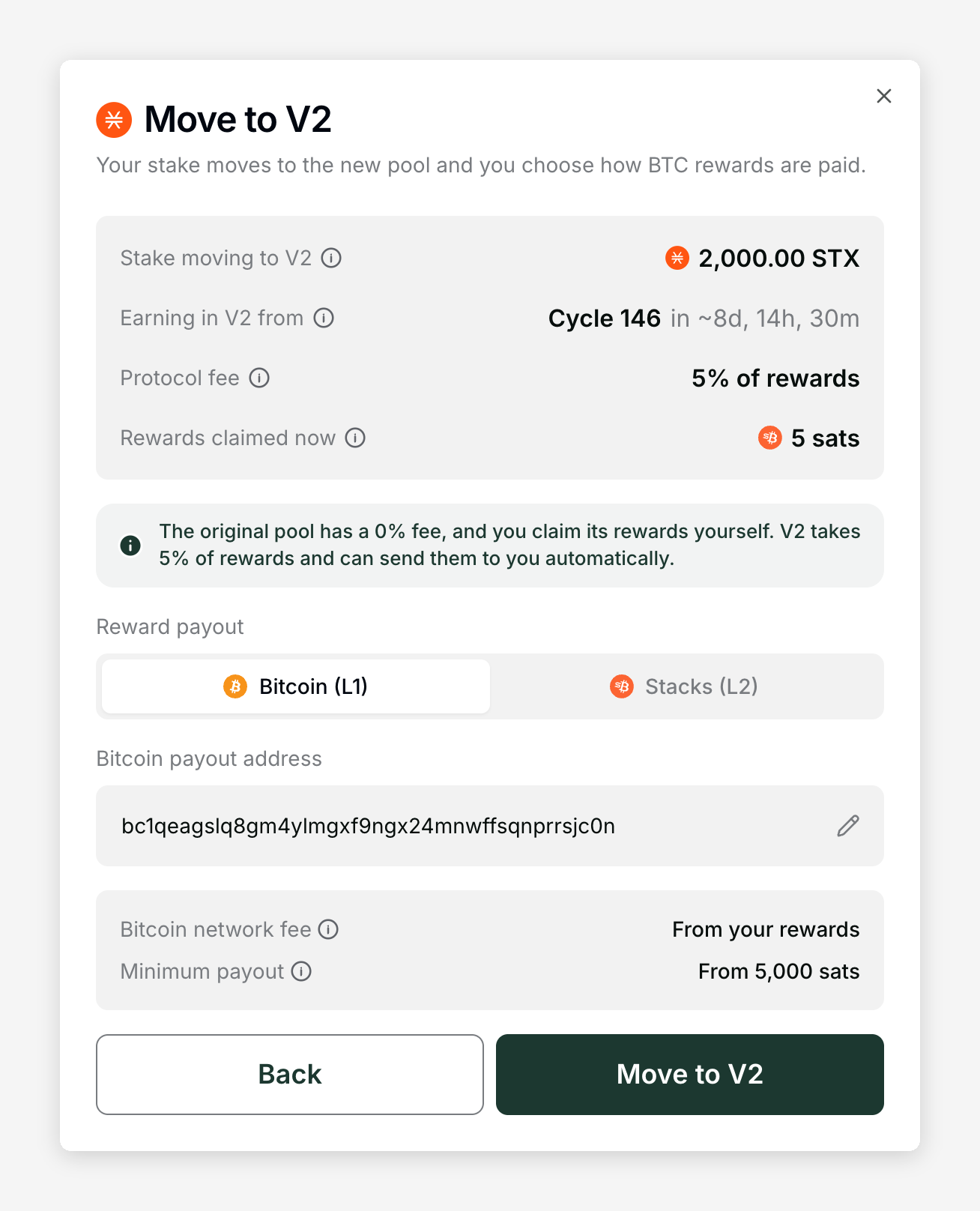
Stakes made before native staking V2 are in the **Original Pool**, which has a 0% fee. Moving to V2 is optional. If you have one, your Native Staking card is labelled Original Pool and has a **Move to V2** button. When you select Native Staking in the stake form, the card compares the Original Pool and the V2 Pool and marks where your stake is.
{% stepper %}
{% step %}
## Start the move
Click **Move to V2**.
{% endstep %}
{% step %}
## Review the details
Review the details: the stake being moved, the cycle from which it earns in V2, the 5% protocol fee on rewards, and any rewards you have already earned in the original pool. Those rewards are sent to your Stacks wallet as sBTC in the same transaction.
{% endstep %}
{% step %}
## Choose reward payout
Under **Reward payout**, choose how you want your rewards from now on. The Bitcoin option needs at least 2,000 STX staked.
{% endstep %}
{% step %}
## Move to V2
Click **Move to V2** and approve in your wallet. The move is a single transaction.
{% endstep %}
{% endstepper %}
Good to know:
* Your stake keeps earning in the original pool until the next cycle starts, then earns in V2.
* Rewards from your last cycle in the original pool appear on the **Bitcoin Rewards** card for you to claim once they are distributed.
* New deposits always go to the V2 Pool. To add STX, select Native Staking in the stake form and enter a higher total. The button reads Move to V2 and stake. Your whole stake then moves to V2, and the 5% fee applies to the rewards on all of it.
* Moving is paused during the prepare phase, like staking.
## If your STX is staked somewhere else
Your STX can only be staked in one place at a time. If it is already staked with another pool or signer, the stake form shows "Your STX is staked with another signer. You can stake it here once it unlocks."
Unstake it where it is currently staked. Positions with Xverse Pool and FastPool appear under **Active positions** with an **Unstake** button. Once your STX unlocks, you can stake it in the Stacking DAO native pool.
## Staking Overview
Once you are staked, the **Staking Overview** section shows the progress of the current cycle, when rewards are next distributed, the rewards generated so far in the cycle, and your estimated annual yield.


 {% endtab %}
{% tab title="Rewards sent as sBTC" %}
They arrive in your Stacks wallet on their own once at least 1,000 sats have built up. Until then they wait on a **Native staking payout** tile. Click **Withdraw** on it to receive them right away.
{% endtab %}
{% tab title="Rewards sent as sBTC" %}
They arrive in your Stacks wallet on their own once at least 1,000 sats have built up. Until then they wait on a **Native staking payout** tile. Click **Withdraw** on it to receive them right away.